> ## Documentation Index
> Fetch the complete documentation index at: https://docs.reclaude.ai/llms.txt
> Use this file to discover all available pages before exploring further.
# Install the CLI
> Install the reclaude CLI on macOS, Linux, and Windows with one line. Includes auto detection of amd64/arm64, automatic Claude Code download on first run, IDE extension configuration, PATH verification, and version pinning flags.
## One-line install
```bash macOS / Linux theme={null}
curl -fsSL https://reclaude.ai/install.sh | bash
```
```powershell Windows theme={null}
iwr https://reclaude.ai/install.ps1 -UseBasicParsing | iex
```
The script will:
* Detect your OS and CPU architecture (amd64 / arm64, including macOS Rosetta 2).
* Download the matching binary, verify SHA256, and place it on your PATH.
The script no longer bundles Claude Code. reclaude downloads Claude Code automatically the first time you run it (no VPN needed); if you already have the official Claude Code, reclaude uses yours and won't override it.
After installing, open a **new terminal** so PATH refreshes. Verify with `reclaude version`.
## Windows notes
* **Use a normal PowerShell window**, don't "Run as administrator". The installer writes to `%LOCALAPPDATA%\Programs\reclaude\bin` (under your user home); admin PowerShell uses a separate PATH from your daily shell and will leave the `reclaude` command unreachable.
* A **64-bit PowerShell** is required. The script self-checks and exits if it detects 32-bit.
* Antivirus / EDR false positives: the script verifies SHA256 on the download, but some corporate antivirus tools may block writes. If you see `Access is denied`, disable the relevant protection or whitelist `%LOCALAPPDATA%\Programs\reclaude` and retry.
* **Claude Desktop** (MSIX channel) is auto-discovered by reclaude — no extra path config needed.
## Common flags (macOS / Linux)
| Flag | What it does |
| ----------------- | ----------------------------------------- |
| `--version ` | Pin a specific version (default `latest`) |
For example, pin to a specific version:
```bash theme={null}
curl -fsSL https://reclaude.ai/install.sh | bash -s -- --version v1.4.2
```
## Manual download
If the script can't run, grab the binary directly:
| OS | Arch | File |
| ------- | ----- | ---------------------------- |
| macOS | arm64 | `reclaude-darwin-arm64` |
| macOS | amd64 | `reclaude-darwin-amd64` |
| Linux | arm64 | `reclaude-linux-arm64` |
| Linux | amd64 | `reclaude-linux-amd64` |
| Windows | amd64 | `reclaude-windows-amd64.exe` |
URL pattern: `https://dl.reclaude.ai/latest/`. After downloading, mark it executable and put it on your PATH, then run `reclaude setup` to copy it into the standard location.
## IDE extension setup
If you use the official Claude Code IDE extensions (VS Code, JetBrains, etc.), configure the extension to **launch Claude through reclaude**. Otherwise, requests bypass reclaude and go straight to Anthropic.
1. Open the extension settings (VS Code: `Ctrl/Cmd + ,` → search `Claude Process Wrapper`; JetBrains: `Settings → Tools → Claude Code`).
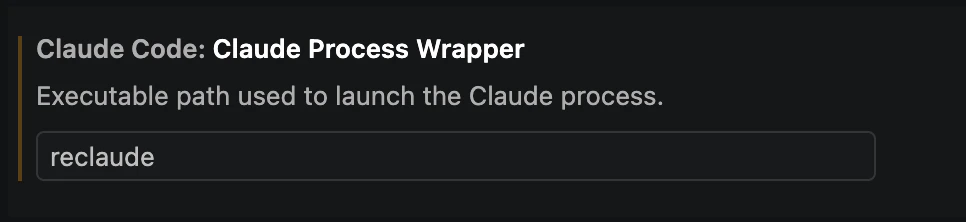
2. Find **Claude Code: Claude Process Wrapper** (description: *Executable path used to launch the Claude process*).
3. Set the executable path to `reclaude` and save.
 4. Restart the IDE so the setting takes effect.
Once configured, the IDE extension launches Claude through reclaude, and your account, device, and quota follow whichever reclaude account you're signed into.
This is a **built-in setting on the official Claude Code extension** — no extra plugins required.
## Update and uninstall
```bash theme={null}
reclaude update # check and upgrade to the latest version
reclaude uninstall # full uninstall
```
4. Restart the IDE so the setting takes effect.
Once configured, the IDE extension launches Claude through reclaude, and your account, device, and quota follow whichever reclaude account you're signed into.
This is a **built-in setting on the official Claude Code extension** — no extra plugins required.
## Update and uninstall
```bash theme={null}
reclaude update # check and upgrade to the latest version
reclaude uninstall # full uninstall
```